
Create from text
Specify the subject, composition, materials and lighting. Develop an illustration, product scene or concept for an advertisement.
Create an image from a description, include lettering or edit a photograph. AITale offers GPT Image 2.6 Sunburst for text prompts and reference-based changes. Choose your composition and bring an idea to life.
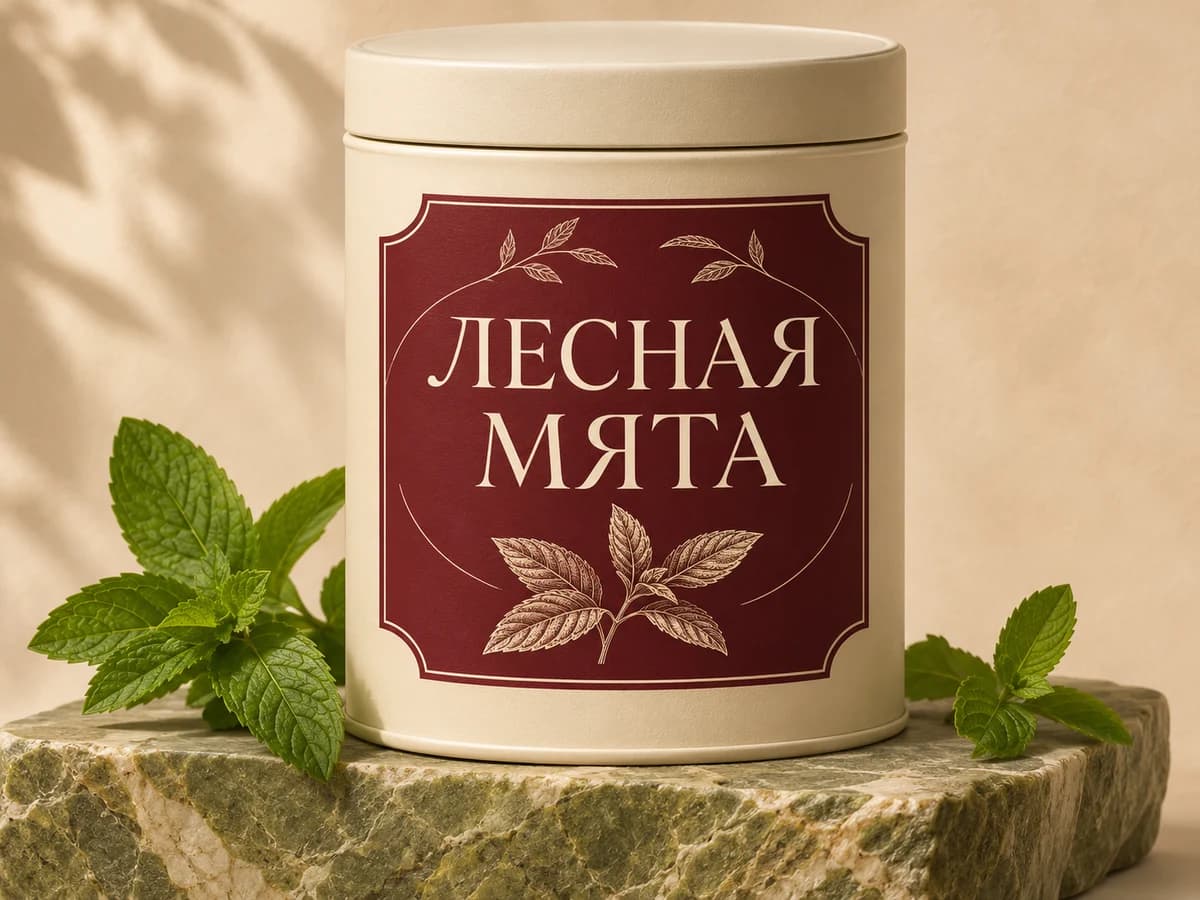 A product scene idea
GPT Image is OpenAI’s family of image creation and editing models. Generation 2.6 includes Sunburst for detailed visual work and Flare for fast iteration. AITale offers Sunburst. This guide explains the official model variants and the features available in our editor.
Specify the subject, composition, materials and lighting. Develop an illustration, product scene or concept for an advertisement.
Put the exact words in quotes and explain where they belong. Review the spelling carefully before using a card, label or poster.
Add a photo and describe the changes. Identify the features, objects and details that should be preserved.
Choose an aspect ratio and 1K, 2K or 4K output. AITale uses PNG and preselected quality settings for Sunburst.
A model generation and a variant within it are different concepts. Inclusion in this overview does not mean a model can be selected in AITale.
| Version | Main distinction | On AITale |
|---|---|---|
| GPT Image 1.5 | An earlier generation still mentioned in older guides and comparisons. | Not offered |
| GPT Image 2 | An earlier generation with existing search demand and tutorials. | Removed from catalogue |
| GPT Image 2.5 | A previous generation with Sunburst and Flare variants. AITale now uses 2.6. | Replaced by 2.6 Sunburst |
| GPT Image 2.6 Sunburst | OpenAI recommends this variant for demanding detail, composition and edit accuracy. The variant available in AITale. | Available |
| GPT Image 2.6 Flare | OpenAI’s smaller model for workflows where speed matters most. A separate 2.6 variant, not a Sunburst quality setting. | Not offered |
The model overview follows official OpenAI documentation. Of the 2.6 variants, AITale offers Sunburst; Flare is included for comparison.
Try a brief with a clear subject, visual style and exact wording for any text you want in the image.
Add a short greeting or heading. Specify the wording, typography and empty space around the lettering.
Plan the lighting and setting around packaging or an object. Upload a reference if an existing design matters.
Explore compositions for banners and social posts. Check claims, lettering and product accuracy before publication.
Change the setting, objects or mood. Separate requested changes from the features that should remain unchanged.
Use a description alone or add a reference photo in AITale’s editor. No model download or separate API integration is needed.
Sign in, open Images and select GPT Image 2.6 Sunburst. Choose the aspect ratio and output size.
Describe the subject, background, light and style. Quote exact lettering. For an edit, upload a photo and state what to preserve.
Check spelling and visual details. Refine the prompt if needed and generate a new version. Download when the image is ready.
These prompts specify the subject, constraints and lettering. Adapt them to your brief and choose the model in the editor.
Create a product photograph of a cream cylindrical tea tin on an olive stone plinth. On its burgundy label, write only the Russian words “ЛЕСНАЯ МЯТА” in large legible type on two lines. Fresh mint leaves nearby, ivory background, soft studio lighting. No other text or logos. Landscape 4:3 format.
Create a birthday card with delicate wildflowers on pale textured paper. Leave generous space at the top and add one clearly legible line: “Happy Birthday!”. Warm natural light, a quiet composition. No other text. Portrait 3:4 format.
Edit the uploaded photograph: replace the background with a coastline in soft evening light. Preserve the person, facial features, age, pose and clothing. Match shadows and light direction to the new background. Do not add lettering or other people.
Create a landscape illustration of a cosy bookshop with large windows, warm lighting and green plants. Leave a clear pale area in the left third for a heading to be added later. Realistic materials and perspective. Do not generate text, logos or watermarks.
Sunburst generations use your shared AITale balance. Pricing depends on output size and applicable account terms. Check the price shown in the editor before starting.
Choose a size for your task. The 4K option uses enlargement from 2K; it does not promise native generation of additional detail.
AITale uses PNG output and preset quality settings for Sunburst. Choose the output size and aspect ratio, then describe your idea.
An available bonus balance can be used at the normal generation price. The five weekly free attempts for Nano Banana 2.1 and Pro do not apply to GPT Image.
See the editor and pricing page for current rates and offers. A subscription bought from another service does not fund your AITale balance. An account is required; unlimited free use is not offered.
Current pricingExplore Nano Banana 2.1 and Pro for portraits, new looks and photo edits. Compare the models on the same prompt.
Explore Nano Banana 2It is a variant of the GPT Image 2.6 family for image creation and editing. AITale offers Sunburst for text prompts and edits guided by reference photos.
OpenAI describes Sunburst as a model for detailed visual work and precise edits, and Flare as the smaller model for workflows where speed matters most. AITale offers Sunburst; Flare is described for comparison.
No. GPT Image 2 was removed from our catalogue, and the editor now offers GPT Image 2.6 Sunburst. Previous generations are described for context, not as selectable modes.
There is no dedicated weekly free allowance for GPT Image on AITale. Generations use your balance, including an available bonus balance. Nano Banana’s free attempts do not apply to GPT Image.
Yes. Quote the exact text and describe its position and size. The model can also work with Cyrillic text. Check every character before publication; exact spelling is not guaranteed.
Add the source photo as a reference, describe the changes and specify what should stay the same. Review the result because unintended details can change.
No model installation is needed to use AITale online. An AITale account is required to generate images and save your results.
No. AITale is an independent platform providing access to selected models. This page describes access through AITale, not the developer’s website or subscription terms.
They are different model families. Compare the same prompt and reference, looking at composition, lettering and preservation of details. Both families are available in the AITale editor.
Official OpenAI documentation describes additional capabilities, but AITale’s GPT Image 2.6 Sunburst editor uses PNG without a separate transparency control. GIF and SVG are not offered in this mode.
Start with a prompt or upload a photo to edit. Select GPT Image 2.6 Sunburst in the editor and check the price before generating.
